Ten minutes now saves you the "wait, what does this button do" later. And if you are not signed up yet, this is the honest tour of what you would be getting.
01 · Getting started
Sign in with Google, and that is the whole setup.
That one step is also how Holidr connects to your inbox: the Assistant reads your work email, and everything it does starts from there. On first connect it reads your recent mail, finds the conversations that are actually trips, and lays them out as your board. Give it a minute on the first sync.
02 · The board
An inbox of trips, not a pipeline chart.
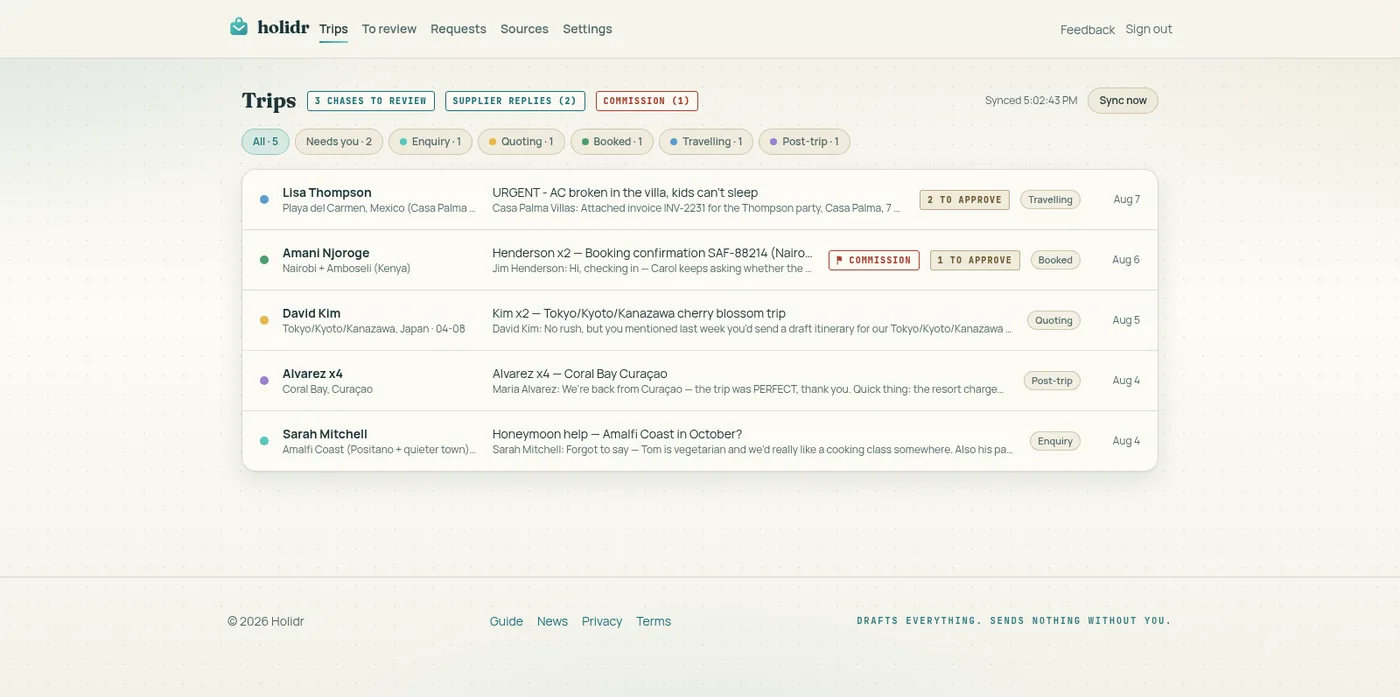
Each row is one trip: who it's for, where it stands, the last thing that happened. Newest activity floats up, the way you'd expect your inbox to.
Above the list you may see pills. Chases is mail the Assistant has already drafted and is waiting for you to approve. Unfiled is mail it read but could not place on a trip, worth a skim once a day. Commission is money that arrived short: rare, and worth clicking the moment you see it. Supplier replies is a supplier who has answered a request of yours, waiting on your Requests page.
holidr.com
03 · Inside a trip
The whole story on one timeline.
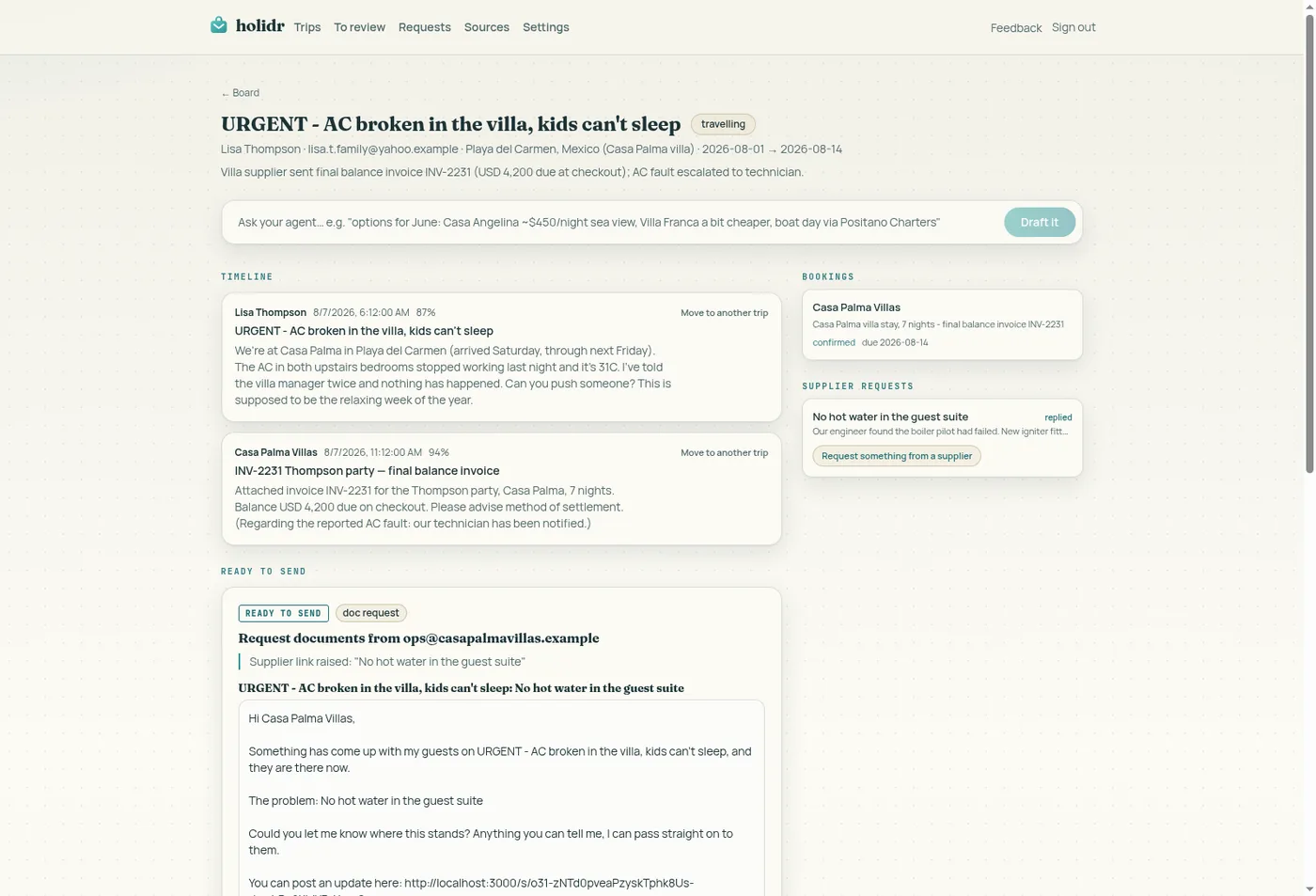
The client's messages, your replies, supplier confirmations, invoices: new mail lands on the trip on its own, and you never file anything.
Attached documents (PDF invoices, itineraries, spreadsheets) show as small cards under their message. The Assistant reads them too, so "balance due 12 September" in a PDF is something it knows, not something trapped in a file. Click a card and the document opens right there, no hopping back to your inbox; the original is always one more click to download.
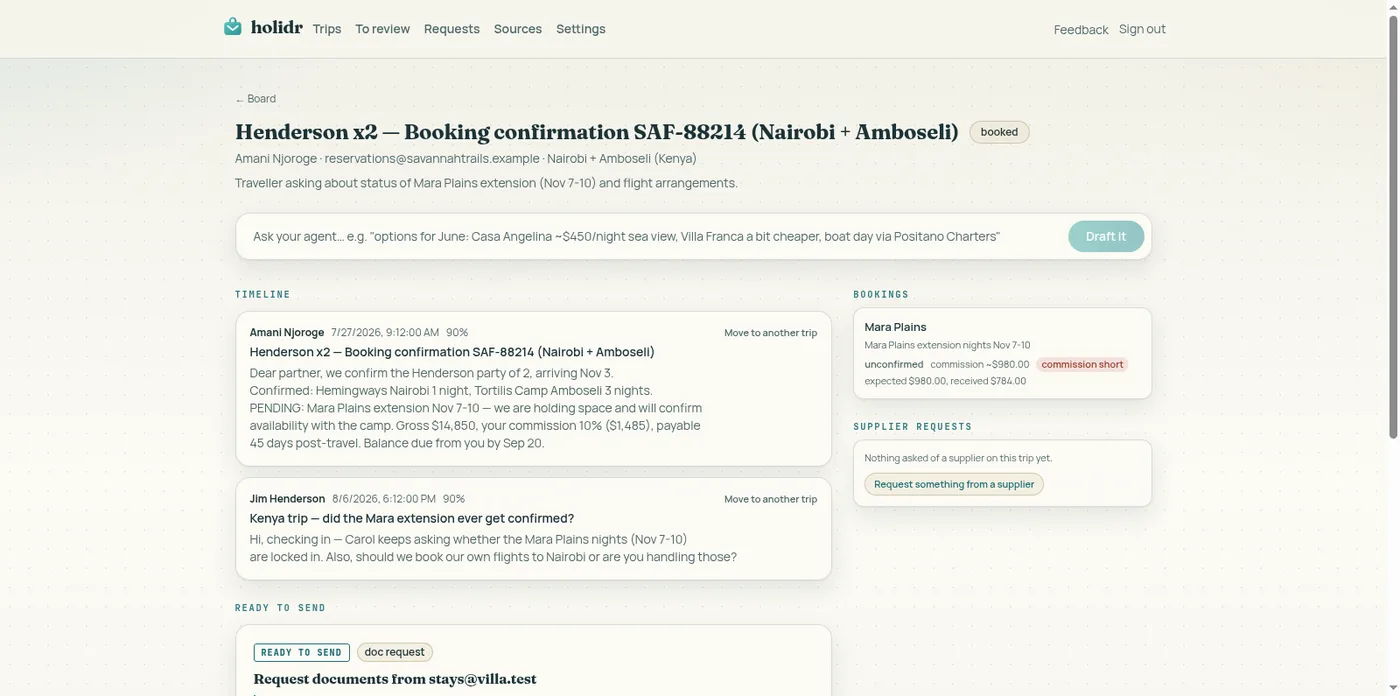
Filed to the wrong trip? Every message has a quiet "Move to another trip". One click, done, and the Assistant learns from the correction. Bookings sit beside the timeline with their status, due dates and expected commission.
holidr.com
04 · Drafts and approvals
The Assistant drafts. You send.
The rule that makes everything else safe: nothing leaves under your name without your approval.
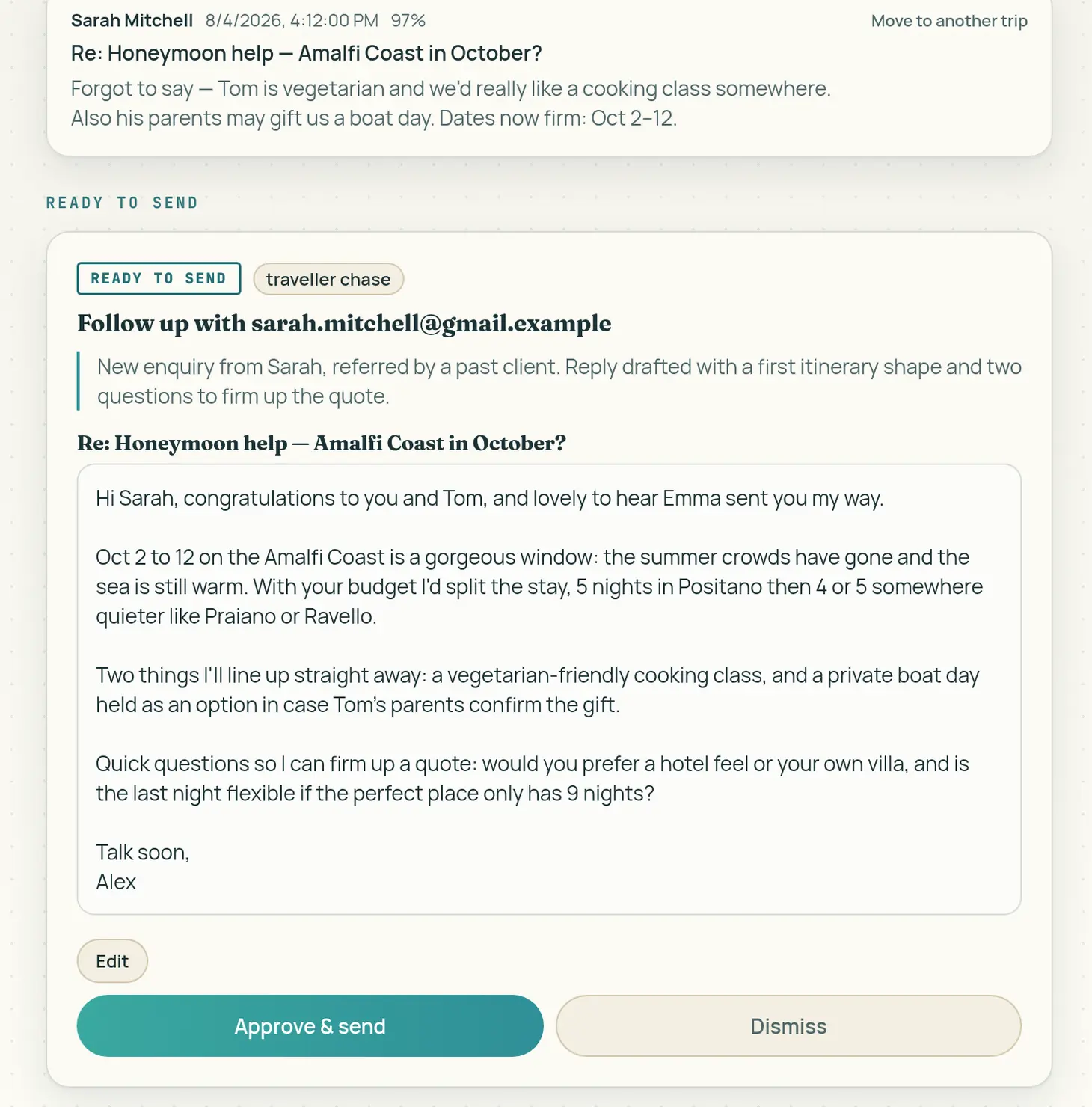
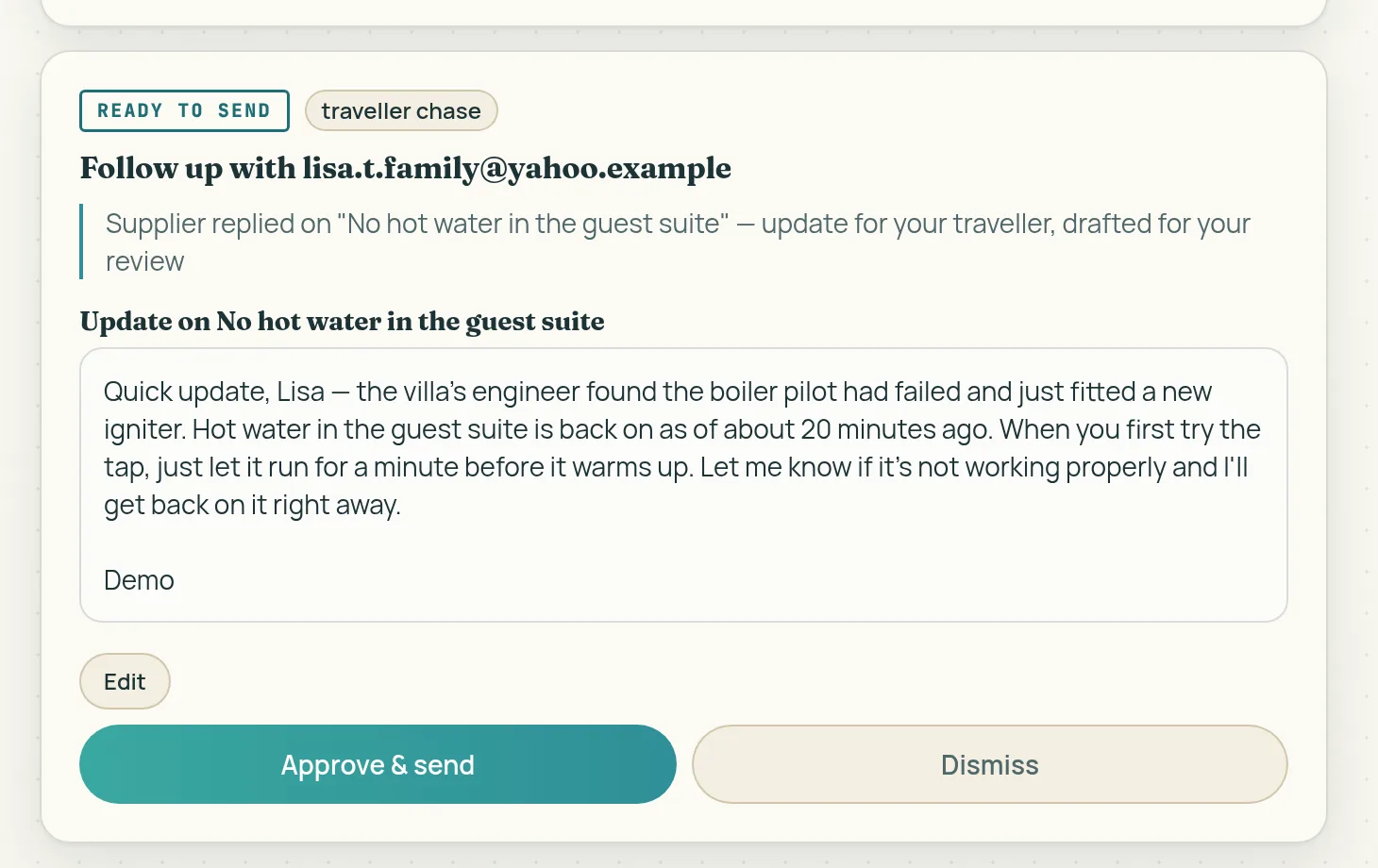
When a client writes, a reply is drafted for you. When a supplier goes quiet past a due date, a nudge is drafted. When commission arrives short of what a booking promised, a polite query to the supplier is drafted with the numbers already in it. Each draft tells you why it exists, and waits at the end of the trip it belongs to, marked Ready to send, right under the conversation it answers. Read it, tweak it if you like, approve it, and it goes from your own address.
Nothing to hunt for: trips with a draft waiting carry a chip on your board, and the Needs you filter narrows the list to just those.
holidr.com
05 · Ask your agent
Plain instructions, real work.
The box at the top of every trip takes instructions the way you would give them to a sharp assistant: "Tell Carol the villa is confirmed and the balance is due on the 12th." "Chase the DMC about the airport transfer." "Find 4-bed villas with a pool in Paros, first week of September."
Emails come back as drafts for your approval. Research comes back as a brief on the trip.
06 · Research
Priced options from the sites you trust, and only those.
Ask for options and the Assistant searches the sources you have vetted. It comes back with real properties: photos, live prices, links, laid out on the trip. Open the full brief, tick the ones worth sending, set your margin if you price that way, and it drafts the client email around your picks. Client prices are computed from your margin; the email never mentions the markup.
No client yet? Type the ask into the box on the board ("a Dolomites stay under 500 euros with breakfast, March, two adults") and it opens as a trip of its own with the brief on it. Name a client and the trip is theirs; research runs either way when you have it switched on.
Manage the sites on the Sources page. Add one and the Assistant teaches itself the site; a "Fast search" badge means it can pull prices in seconds. Prices show in the currency you pick there.
07 · Commission watch
Money you earned, checked without you.
When a booking is confirmed, Holidr notes the commission it should pay you. When the remittance arrives, even inside a PDF, the Assistant reads the amount actually paid and settles the score: paid in full is marked quietly on the booking, and a short payment gets a flag on the trip, a Commission pill on your board, and a polite query to the supplier with the exact figures, drafted and waiting for your approval.
A top-up that settles the balance withdraws the pending query on its own, so you can never accidentally chase money that has already arrived.
holidr.com
08 · One link for suppliers
The villa manager answers from their phone.
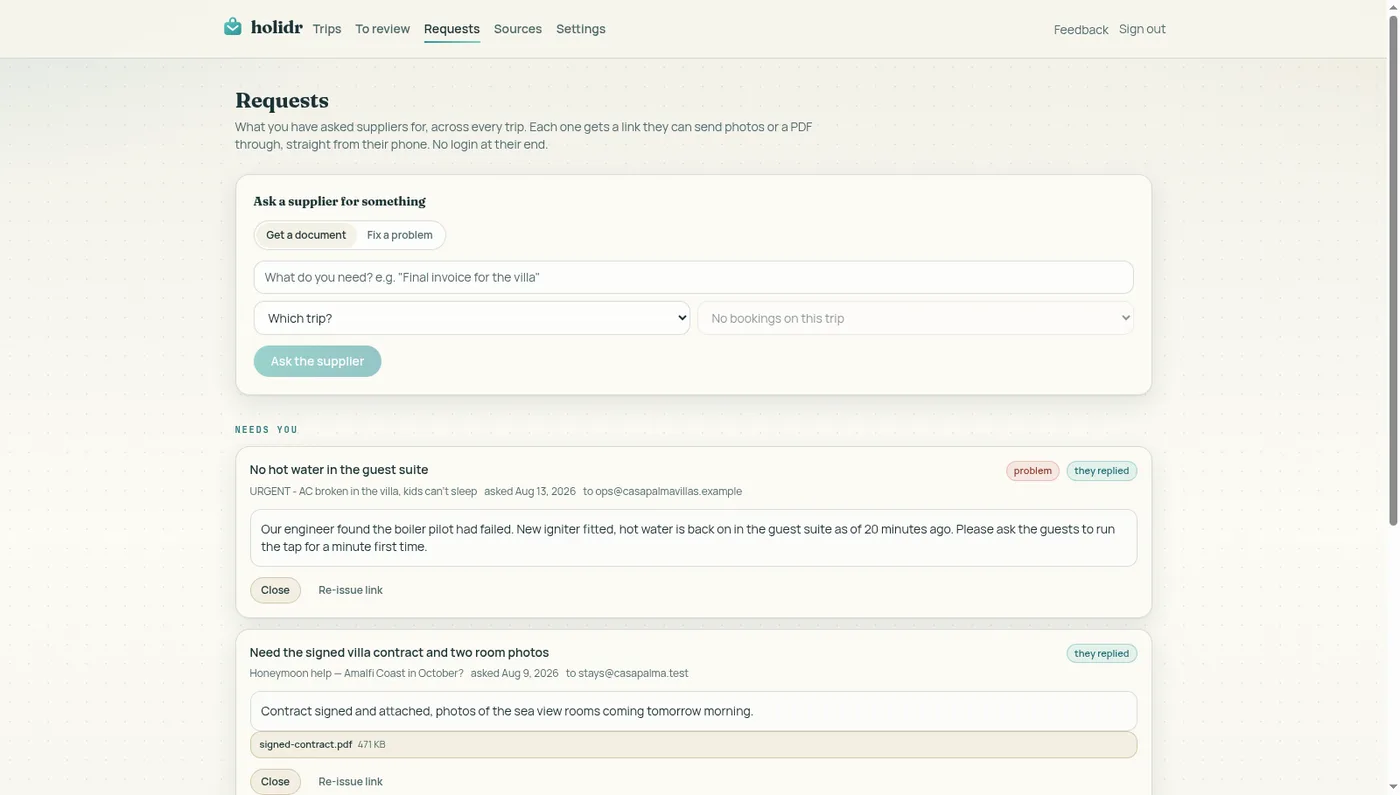
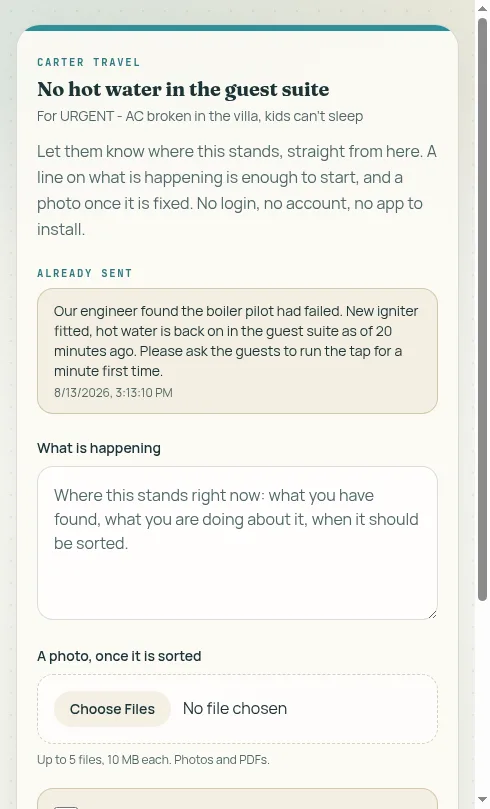
Your Requests page holds two kinds of ask. "Get a document" is the everyday one: the final invoice, the signed form, the photos you are missing. "Fix a problem" is for the day something goes wrong for a guest who is there right now; more on that below. Either way you pick the trip, name the thing, and Holidr drafts the supplier email with a single link inside. What they open is a simple page with your name on it: a note box, a photo button, a done button. No account, no app, works on any phone. If your supplier lives on WhatsApp, send the link there instead.
What comes back does not just sit in a pile. The Assistant reads a posted invoice the same way it reads one that arrives by email: a one-line summary appears on the request card, and if the document settles commission, Commission watch does its arithmetic on its own. The moment a supplier posts anything, a short note lands in your inbox and a pill appears on your board, so nothing depends on you going to look.
Silence is handled too. A document request that sits unanswered gets a polite follow-up drafted after three days, then weekly, threaded onto the original email so the supplier has the link one message up. Links expire after 30 days, die instantly when you close a request, and can be re-issued fresh whenever you need. And when a supplier ticks "that is everything", the request comes back to you to confirm and close: their word ends nothing on its own.
holidr.com
09 · When something breaks mid-trip
The guest never sees the machinery. They just see you being fast.
Your client emails you from the villa: no hot water in the guest suite. The Assistant reads it, sees the trip is travelling, and proposes the ask to the supplier for you: the problem in one line, and a link where the manager can answer from the corridor outside the room. You approve it, it goes.
The manager posts a line on what is happening, and a photo once it is fixed. The Assistant reads their update and drafts your reply to the guest: your words, their facts, waiting on the trip for your approval. If the supplier goes quiet, the follow-up is drafted after four hours rather than three days, because a guest standing in a cold shower is not a paperwork problem. And when the manager ticks "it is sorted", you get the final say on whether it actually is.
One thing worth being precise about, because it is the question everyone asks: the link is between you and the supplier, full stop. Your client never sees it and never gets it, and the page behind it never shows your client's name, their email, or anything about the trip beyond the title you chose. What your client receives is what they always receive: an email from you, sounding like you, that you approved.
holidr.com
holidr.com
10 · Your brand on every proposal
Styled once, on every proposal after.
On the Settings page you set your business name, colour, logo, sign-off and the small print (your ABTA or ATOL line), with a live preview beside the form. From then on, every proposal you approve goes out as a branded email carrying your look, with your plain words underneath for any client whose mail app prefers them. The review queue shows you the styled version before you send it.
11 · When something needs you
Built to fail loudly rather than guess.
Mail it could not place waits in Unfiled with an honest label, one click from the right trip. And if you think something real was dismissed, ask in plain words: "did an enquiry about Paros come in last week?" The Assistant searches what it set aside and offers to file whatever fits. A document it could not read says so on the trip, so you know to open that one yourself. A short commission is flagged, never silently absorbed.
12 · What the Assistant never does
Every email that leaves is yours.
It never sends without your approval. It never invents hotels, prices, or availability. It never mentions your margin to a client. And it never speaks as anyone but you: from your address, in your voice, under your name.
Ready to try it?
Founding cohort, first 100 advisors, no card required.